
SCADA Alarms—How They Help Avoid Machine Failures
(Understanding the Alarm Window in Industrial Automation)
In modern industrial environments, unexpected machine failure leads to production loss, safety risks, and high maintenance costs. One of the most effective tools to prevent such failures is the SCADA Alarm System. Properly configured SCADA alarms act as an early warning mechanism, allowing operators and maintenance teams to take corrective action before a fault becomes a breakdown.
What Are SCADA Alarms?
SCADA (Supervisory Control and Data Acquisition) alarms are automatic notifications generated when a process variable exceeds predefined limits or when abnormal conditions occur in machines or systems.
These alarms are displayed in a dedicated Alarm Window on the SCADA screen and may include:
-
Visual alerts (color change, blinking)
-
Audible alarms
-
Time-stamped event logs
Common alarm sources include:
-
Motor overloads
-
High temperature
-
Low pressure
-
Sensor failures
-
Communication loss
-
Emergency stop activation
Understanding the SCADA Alarm Window
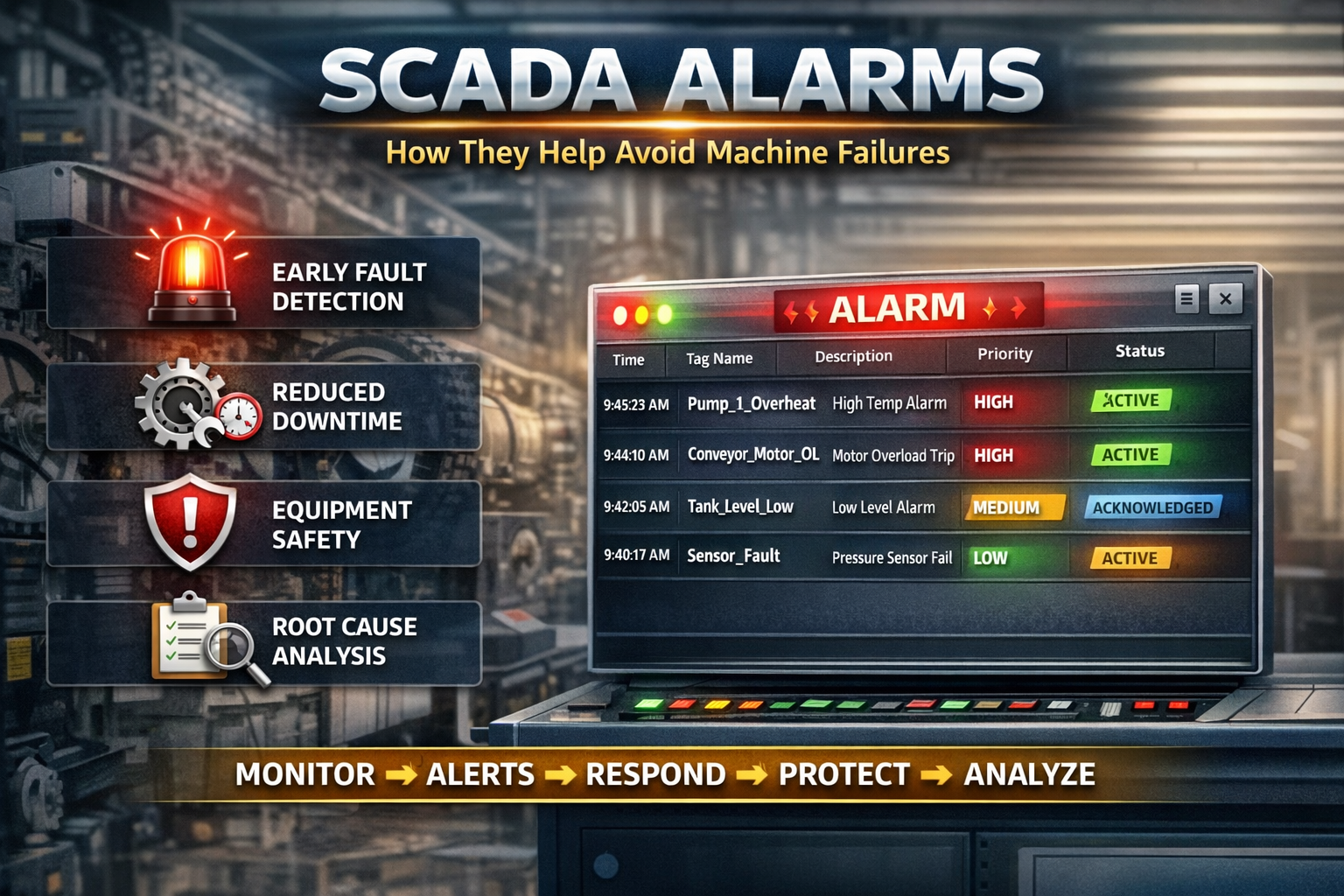
The Alarm Window is the operator’s first line of defense against machine failure. It provides a real-time list of active, acknowledged, and historical alarms.
Typical Alarm Window Displays:
-
Alarm Tag Name (e.g., Conveyor_Motor_OL)
-
Description (Motor Overload Trip)
-
Severity Level (High / Medium / Low)
-
Date & Time
-
Status (Active, Acknowledged, Cleared)
A well-designed alarm window helps operators identify the root cause quickly and respond without confusion.
How SCADA Alarms Prevent Machine Failures
1. Early Fault Detection
SCADA alarms detect abnormal conditions before equipment reaches a critical failure point.
Example:
-
Bearing temperature rising above normal
-
Current consumption exceeding rated value
Early alerts allow maintenance teams to act before permanent damage occurs.
2. Reduced Downtime
Instead of sudden breakdowns, alarms provide predictive warnings, enabling:
-
Planned maintenance
-
Controlled shutdowns
-
Faster troubleshooting
This significantly reduces unplanned downtime and production loss.
3. Improved Operator Response
Clear alarm messages guide operators on what action to take:
-
Stop the machine
-
Reduce load
-
Reset fault
-
Call maintenance
This minimizes human error and improves response time.
4. Enhanced Equipment Safety
Critical alarms such as
-
Overvoltage
-
Overcurrent
-
Hydraulic pressure loss
-
Emergency stop
Protect motors, drives, and mechanical components from severe damage.
5. Alarm History for Root Cause Analysis
SCADA systems store alarm logs that help engineers:
-
Identify recurring faults
-
Analyze failure patterns
-
Improve machine logic and interlocks
This data-driven approach helps prevent future failures.
Importance of Alarm Severity Classification
Not all alarms are equal. A good SCADA system categorizes alarms by severity:
-
High Priority – Immediate action required (Safety risk / machine damage)
-
Medium Priority – Process deviation
-
Low Priority – Information or warning
Proper classification avoids alarm flooding, ensuring operators focus on what truly matters.
Best Practices for Effective SCADA Alarms
To fully benefit from SCADA alarms:
-
Avoid unnecessary alarms
-
Use meaningful alarm descriptions
-
Define clear setpoints and limits
-
Regularly test alarm functionality
-
Train operators on alarm response procedures
A poorly designed alarm system can be ignored, while a well-designed one prevents failures and saves costs.
Conclusion
SCADA alarms are not just notifications—they are critical tools for machine protection, safety, and operational efficiency. The alarm window gives real-time visibility into system health, enabling industries to move from reactive maintenance to preventive and predictive maintenance.
By implementing a structured and intelligent SCADA alarm strategy, industries can avoid machine failures, reduce downtime, and increase equipment lifespan.